TwinGraph Server Publishes to BigQuery Graph
The operational graph your systems actually run on, now queryable in the warehouse your business already uses.
By The TwinGraph team
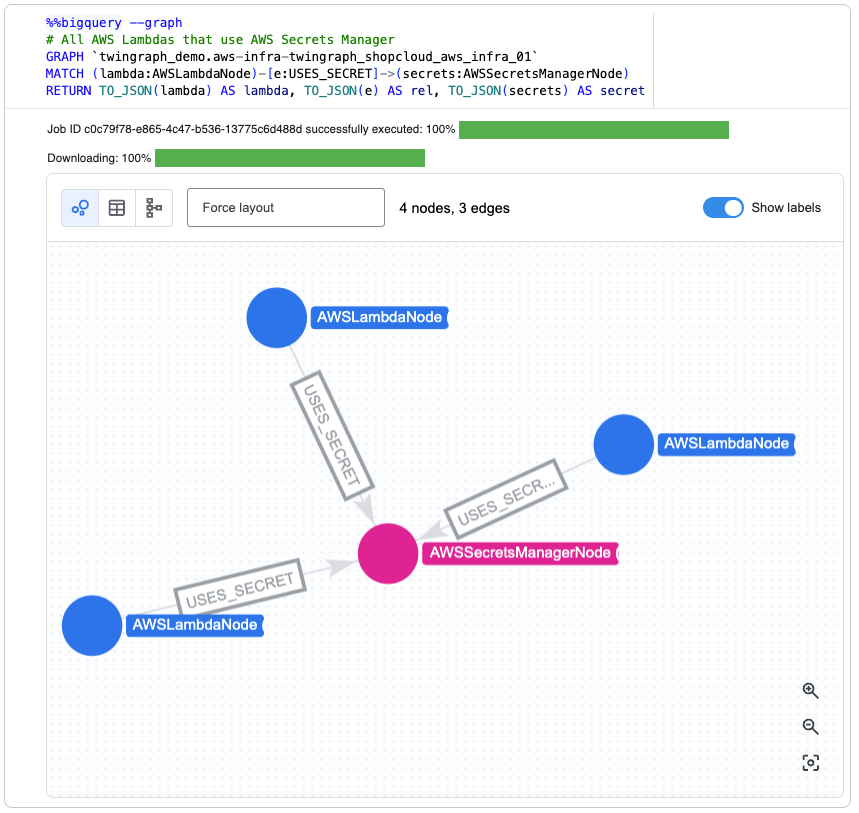
A TwinGraph published to BigQuery Graph, queried with GQL and visualized in BigQuery Studio. Typed node labels (AWSLambdaNode, AWSSecretsManagerNode) and edge labels (USES_SECRET) are preserved from the live graph.
The launch of BigQuery Graph simplifies analytics workloads by bringing native graph traversal directly into BigQuery. For the first time, the warehouse most enterprises already run can traverse relationships natively, using Graph Query Language (GQL) alongside the SQL teams have used for years. You can finally ask "how is this connected to that?" in the same place you were already asking "how much of this did we ship last quarter?"
While BigQuery Graph provides the industry-leading system of record for large-scale graph analytics, modern operations require a system of action to bridge the gap between data and execution.
That gap is exactly where TwinGraph fits.
A TwinGraph is a Live Graph, Not a Stored One
A TwinGraph is a live graph whose nodes can be programmatic objects. MQTT brokers streaming telemetry. AI agents acting on the current state of the graph. gRPC services and serverless functions responding to graph events in real time. A TwinGraph isn't a record of operations. It is your operations.
TwinGraph Server is a persistent server that hosts TwinGraphs concurrently, auto-saves their state, and exposes everything through authenticated gRPC, REST, and WebSocket interfaces. Engineers (and AI Agents) interact with it via TwinGraph SDK and observe it through TwinGraph Browser.
What the BigQuery Integration Adds
Today we are announcing that TwinGraph Server publishes directly to BigQuery Graph.
With one call, the current state of any TwinGraph is written into your BigQuery
dataset as a native Property Graph. Nodes, edges, types, and connection labels
are preserved. Every distinct node type becomes a labeled node table in the
BigQuery Property Graph. Every (ConnectionType, SourceType, TargetType)
combination becomes a labeled edge table. Open BigQuery Studio and the
topology your systems are actively running is there, rendered with the same
labels you see in TwinGraph Browser.
import lucidtc_twingraph as tg

# connect to a graph hosted on a running TwinGraph Server
graph = tg.RemoteTwinGraph(
    twingraph_id="plant-kc",
    server_address="twingraph.prod:50051",
    secure_channel=True,
    auth_token=TWINGRAPH_SERVER_AUTH_TOKEN,
)

# attach a BigQuery graph datastore
bq = tg.GraphStoreBigQueryNode(
    project_id="my-gcp-project",
    dataset_id="twingraph",
    location="us-central1",
)
graph.add_graph_connection(graph_store_node=bq)

# ... add live nodes, agents, brokers, functions ...

# publish the current state of the live graph to BigQuery
bq_access = graph.access_node(bq.twingraph_id)
bq_access.connect()
bq_access.publish_to_graph_datastore()
From there, the same topology is queryable three ways.
GQL directly from the SDK, via the query_gql method on the BigQuery
graph store node:
results = bq_access.query_gql(
    twingraph_id="plant-kc",
    gql="""
    MATCH (n)-[e]-(m)
    RETURN n.TwinGraphID AS twingraph_id,
           e.ConnectionType AS connection_type,
           m.TwinGraphID AS m_twingraph_id
    """,
)
GQL in BigQuery Studio, for engineers and analysts exploring the published property graph:
GRAPH `my-gcp-project.twingraph.twingraph_plant_kc`
MATCH (broker:MQTTBrokerNode)-[e:MQTT_BROKER_CONNECTION]-(tg:TwinGraph)
RETURN broker.TwinGraphID AS broker_id
Standard SQL against the same data, for BI tools, dashboards, and cross dataset joins:
SELECT Type, COUNT(*)
FROM `my-gcp-project.twingraph.twingraph_nodes`
WHERE ParentTwinGraphID = 'plant-kc'
GROUP BY Type
"So Why Not Just Use BigQuery Graph?"
This is the first question a thoughtful reader should ask, and it is worth answering directly.
BigQuery Graph is static. It is a schema over tables that have already been written. It does not run your MQTT broker, subscribe to a topic, invoke an Agent Runtime AI agent, or react to an event. It describes relationships. It does not execute on them.
TwinGraph is live. A TwinGraphNode is not a row, it is a running programmatic object. A broker node opens a connection. An agent node reasons over the graph. A Cloud Run function node invokes serverless logic. The graph does work.
TwinGraph Server stays the source of truth. The BigQuery integration publishes an analytical projection of the live graph. It does not replace the live graph, and it is not a runtime swap.
"Why Not Just Query the TwinGraph Directly?"
The second fair question. You can, and engineers do. The TwinGraph SDK, the TwinGraph Browser, and the gRPC interface are all built for operating the live graph in real time.
But the people who need to reason about the graph rarely live in a gRPC runtime. Analysts work in SQL. Data scientists work in notebooks against the warehouse. BI dashboards join operational data against business data. Compliance and finance run queries that cross every system the company owns.
Publishing the TwinGraph into BigQuery means both audiences are finally reasoning over the same topology:
- Engineers orchestrate the live graph through TwinGraph Server, the SDK, and the TwinGraph Browser.
- Analysts, data scientists, and BI tools query the exact same topology in BigQuery, using GQL for traversals and SQL for everything else.
Same graph. Right tool for each audience.
Why This Matters for Enterprises on Google Cloud
No new graph database to procure, no ETL to maintain. The operational graph lands in a dataset your organization already governs, already bills, and already queries. Procurement, billing, and security review are already done.
Enterprise controls come for free. IAM, VPC Service Controls, CMEK, audit logs, and data residency all inherit from BigQuery. Your security team already approved the controls that now cover your operational graph.
Typed labels render natively in BigQuery Studio. Each node shows with
its real class label (for example, MQTTBrokerNode, VertexAIAgentNode,
TwinGraph). Each edge shows with its connection type (for example, CONTAINS,
MQTT_BROKER_CONNECTION). You get a familiar graph explorer experience without
buying a second visualization tool.
Your graph backend is a choice. TwinGraph Server already publishes to Neo4j. BigQuery is now a drop in alternative through the same SDK surface. Your team picks the backend that fits their stack, not the one a vendor picks for them.
Getting Started
TwinGraph Server is available now through the TwinGraph Enterprise License, with a Google Cloud Marketplace listing coming soon. If you'd like a walkthrough of the BigQuery integration, get in touch.
TwinGraph runs the graph. BigQuery lets the rest of the business query it.